New Sales Contract / Account
Form controls bind directly to table columns and foreign-key lookups, writing real rows and running tax ID and over-billing guards.
Shared ER physical tables powering desktop admin + iPhone viewports (with offline Axure .rp import) — paired with a bidirectional MCP canvas and SQL DDL spec hub for Claude Code and Cursor.
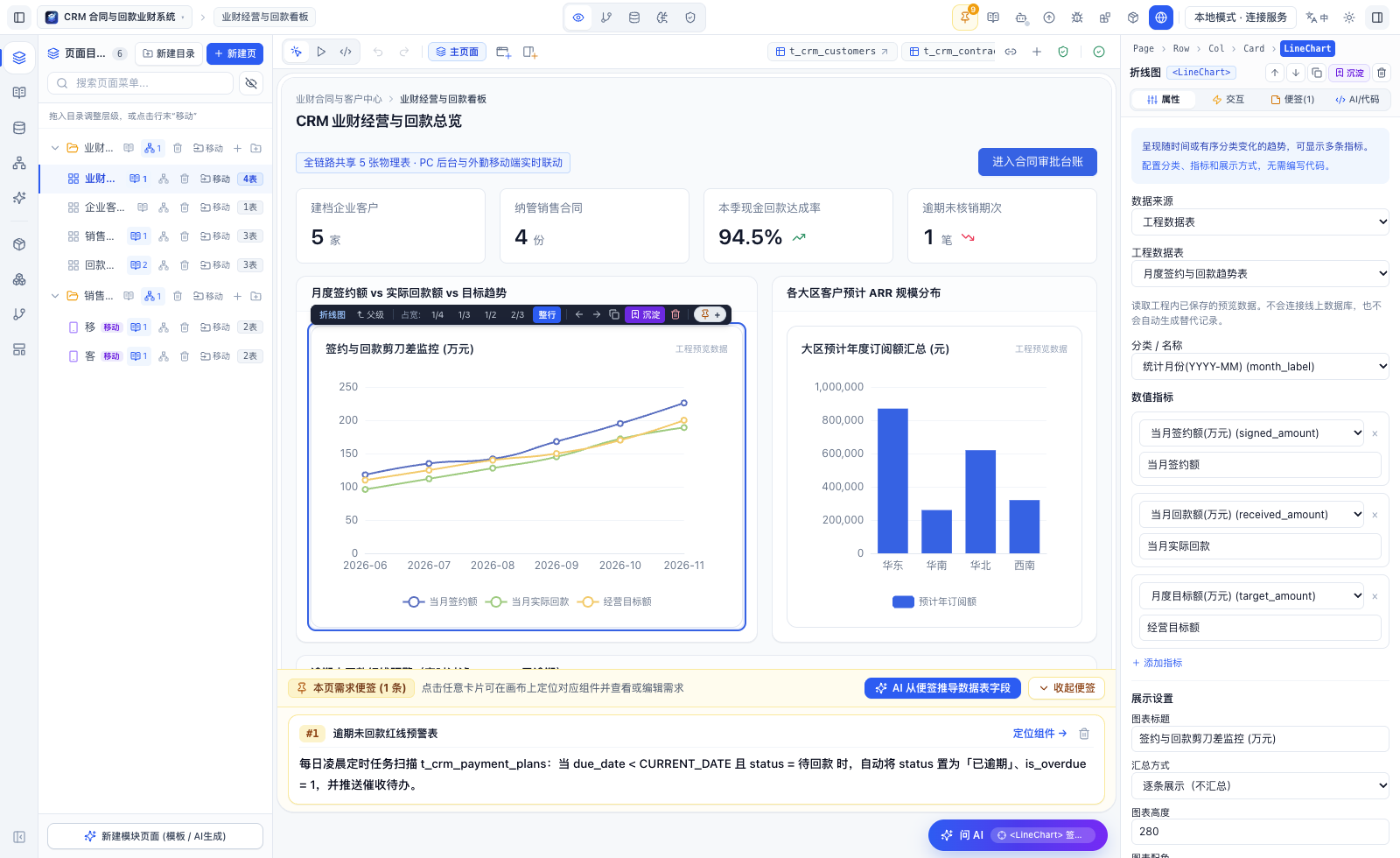
Form controls bind directly to table columns and foreign-key lookups, writing real rows and running tax ID and over-billing guards.
Foreign keys to customers, ENUM status machines, and composite unique payment-plan keys with cross-page impact tracking.
contract_noUNIQUEcustomer_idFK → t_crm_customersstatusENUM('待审','履约中')received_amountDECIMAL(14,2)Backed by the exact same dataset — approving contracts or filing field invoices updates desktop ledgers immediately.
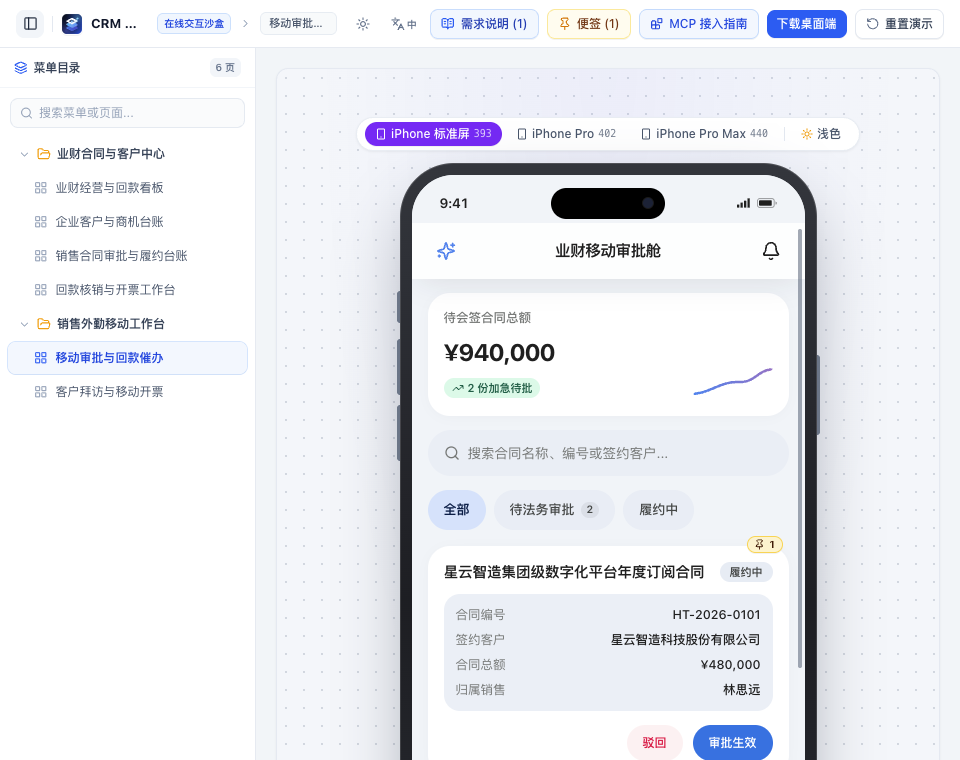
No separate mobile file required. Forms, tables, ECharts, and iPhone viewports read and write the same ER physical tables inside one .pflow project.
Try Mobile Approvals Live →Enable Bidirectional design in the desktop app so Codex, Google Antigravity, Claude Desktop, or Claude Code can model ER tables, edit selected subtrees, and inspect rendered screenshots.
Once a prototype is published for review, developers paste one remote MCP URL into their IDE to read the sitemap, PostgreSQL/MySQL DDL, TSX screens, and sticky-note rules.
{ "mcpServers": { "protoflow": { "url": "https://demo.team/api/v1/mcp/<shareId>" } } }Drop Axure RP 9 or RP 11 binaries into ProtoFlow AI. A local worker restores nested folders, groups, static table cells, master instances, and dynamic panel states offline.
Run read-only inventories or migration drafts per page, folder, or project and verify column-to-schema mappings before modifying layouts.
Generate flow-layout QueryForm + Table + Descriptions pages backed by shared ER tables alongside untouched RP originals, complete with a Converted / Retained / Pending checklist.
Why ProtoFlow AI
Not another click-only drawing board, and not a one-shot HTML generator that scrambles layouts on every tweak.
| Dimension | Static Wireframing Tools | One-Shot AI Web Tools | ProtoFlow AI |
|---|---|---|---|
| Cross-Page Data Flow | Static placeholder text; submitted forms never appear in lists | Hardcoded per-page mocks; state resets across screens |
Bound to real ER physical tables synced live across pages & viewports
|
| AI Collaboration | No project-level context; every screen assembled manually | Guesses ambiguous requirements and dumps a whole page at once |
Clarifies edge cases first → proposes sitemap & ER plan → generates on approval
|
| Iteration & Refinement | Manual alignment across dozens of artboards | Small field edits frequently regenerate and break existing layouts |
Bidirectional AST drag-and-drop + scoped non-destructive AI/MCP edits
|
| Multi-Platform & Legacy | Desktop & mobile split across files; legacy .rp stays static | Hard to share one backend relational dataset across desktop and mobile |
Desktop admin + iPhone viewports in one project, plus native Axure .rp import
|
| Engineering Handoff | Relies on long offline PRDs and verbal field explanations | Lacks relational constraints, unique keys, and acceptance checklists |
Component sticky specs, FK impact analysis & remote MCP DDL/TSX access
|
| Data Sovereignty | Cloud-locked accounts and per-seat SaaS subscriptions | Closed hosted sandboxes without private deployment |
Apache-2.0 open source · Local-first .pflow files + 3-step Docker Compose
|
Read full 2026 comparison (vs. Modao, Pixso, GemDesign & OpenDesign) →
Capabilities
Stop copying context across mindmaps, wireframing tools, schema editors, and coding IDEs.
Model foreign keys and composite unique constraints visually so form writes update desktop ledgers, charts, and iPhone screens live — and parse Axure RP 9/11 .rp binaries offline without Axure installed.
Let Claude Code, Cursor, Codex, or Google Antigravity co-design on your desktop canvas with 18 contract tools + screenshot self-checks — then publish /p/{id} so engineers stream SQL DDL, TSX, and sticky rules via remote MCP.
The built-in Hermes engine asks about thresholds, approvals, and edge cases first, proposes a sitemap + ER blueprint, and supports scoped edits after confirmation.
Widescreen grids, multi-column query bars, master-detail tables, drawers, composite blocks, and sandboxed freeform components synced losslessly with TSX DSL.
Author wide admin consoles alongside iPhone mobile viewports with bottom sheets, capsule tabs, and waterfall feeds backed by the exact same dataset.
Bar, line, area, pie, scatter, radar, gauge, funnel, heatmap, treemap, and sankey charts bind directly to project tables alongside split-screen notes and mindmaps.
Pin validation rules directly onto controls, trace every screen impacted by a schema edit, and audit broken links, unbound foreign keys, and acceptance items.
Projects stay on disk as .pflow archives or Git-friendly trees. Connect the open-source Docker server to publish password-protected, expiring /p/{id} review links.
MCP Co-Design & Handoff
Built-in Model Context Protocol (MCP) support in ProtoFlow AI bridges live AI-assisted prototyping on desktop with read-only spec handoff to your engineering team.
Toggle Bidirectional design in the desktop app so external agents can model shared ER tables, seed FK-valid rows, patch selected components via 18 contract tools, verify layouts via screenshot capture, and support Cmd/Ctrl+Z undo.
Once you share an online review link, engineers copy one Streamable HTTP snippet into their IDE to inspect the full route tree, PostgreSQL/MySQL DDL, page TSX, and sticky-note rules.
{
  "mcpServers": {
    "protoflow": {
      "url": "https://protoflow.example.com/api/v1/mcp/<shareId>"
    }
  }
}Teams & Starter Templates
No sign-in wall, no blank-canvas paralysis, and no throwaway mockups.
Clarify business rules before generating screens, pin acceptance specs onto buttons and fields, and upgrade legacy Axure .rp files without starting over.
Add a requested column or approval step on the spot, show desktop submissions arriving on mobile immediately, and send a /p/{id} link for customer sign-off.
Stream normalized ER DDL, foreign-key closures, page TSX, and sticky constraints straight into Claude Code or Cursor via MCP.
Supplier onboarding, purchase orders, master-detail inbound receipts, 4 shared ER tables, and 5 tax/over-receipt sticky specs.
Table-bound ECharts trend and regional ARR charts, customer opportunity CRUD, payment plans, and cross-platform billing views.
Launch Live Demo in Browser →Consumer waterfall discovery feed, mobile approval drawers, AI assistant view, and live table sync with the desktop admin console.
Model Ecosystem
ProtoFlow AI Desktop ships a verified managed Hermes runtime so you can connect 14+ cloud providers or local Ollama models with adjustable reasoning effort. Every canvas, ER, and publishing tool also works standalone without AI.
 Claude
 Gemini
 DeepSeek
 Qwen
 Kimi
 MiniMax
 Mistral
Brand icons courtesy of LobeHub Icons (MIT). All trademarks belong to their respective owners.
Download & Self-Host
Latest release Loading version
Recommended for your device
macOS 13 or later · Apple Silicon / Intel
Desktop packages currently use the Alex app name (Alex-*.dmg). Drag Alex to Applications; on first launch, right-click → Open or click "Open Anyway" in Privacy & Security once.
Windows 10 / 11 · x64
Run the NSIS installer (Alex-*-win-x64.exe) to pick an install folder and create shortcuts. If Windows SmartScreen appears, click "More info → Run anyway".
Debian / Ubuntu / AppImage · x64
Recommended .deb: sudo apt install ./Alex-*-linux-amd64.deb (retains Alex package name) — supports one-click in-app updates afterward.
git clone https://github.com/EvanClub-Agent/protoflow-ai.git
cd protoflow-ai && npm install
npm run dev              # 浏览器预览工作台
npm run electron:start # 完整 Electron 桌面端cp deploy/.env.example deploy/.env
docker compose --env-file deploy/.env -f deploy/compose.yml up -d
curl -fsS http://127.0.0.1:8088/healthzFAQ
Still have questions? Open an issue on GitHub Issues or email ai.agent.club@gmail.com.
Yes. ProtoFlow AI (formerly Alex) is licensed under Apache-2.0 — free for personal learning, commercial prototyping, and private enterprise self-hosting with no seat limits. You connect your own model keys or local Ollama directly.
Projects save locally on your disk as .pflow archives or unpacked directories, and model credentials are managed locally by Hermes without mandatory login. Snapshots upload to your configured server only when you explicitly click Publish.
Drag an Axure RP 9 or RP 11 .rp file into the launcher or workbench. A local worker parses folders, groups, static tables, masters, and dynamic panels offline without Axure installed, and lets AI map table headers to physical ER columns alongside untouched original pages.
Click "MCP Connect" in the desktop toolbar to install the Antigravity plugin or export a Claude Desktop .mcpb bundle in one click for live canvas co-design. For engineering handoff, publish a /p/{id} demo and copy the remote Streamable HTTP URL into any MCP-compatible IDE.
Absolutely. Launch the desktop app without logging in to use the visual canvas, 114+ materials, ER database designer, 12 ECharts types, Mermaid notes, and local exports. Docker is only needed if you want to host interactive /p/{id} links for browser review.
The desktop binaries currently preserve the Alex package identifier (Alex-*.dmg / Alex-*.exe / Alex-*.deb) for seamless in-app upgrades. Community builds use local signing: on macOS right-click Alex in Applications → Open once (Apple Silicon = arm64, Intel = x64).
Try the interactive live demo in your browser, or download the Apache-2.0 desktop workbench for free with no sign-in required.